
Your caseload and every campus, in one view
See who's due, early, for one caseload or every campus.
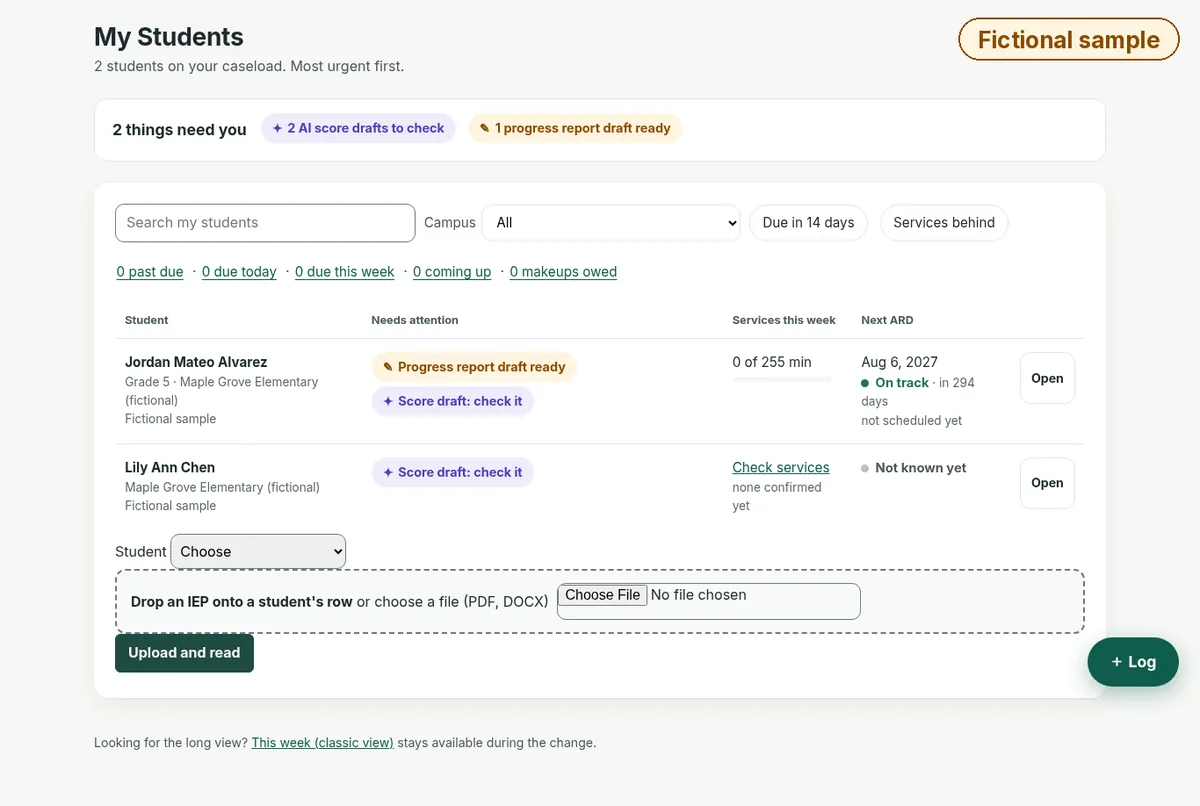
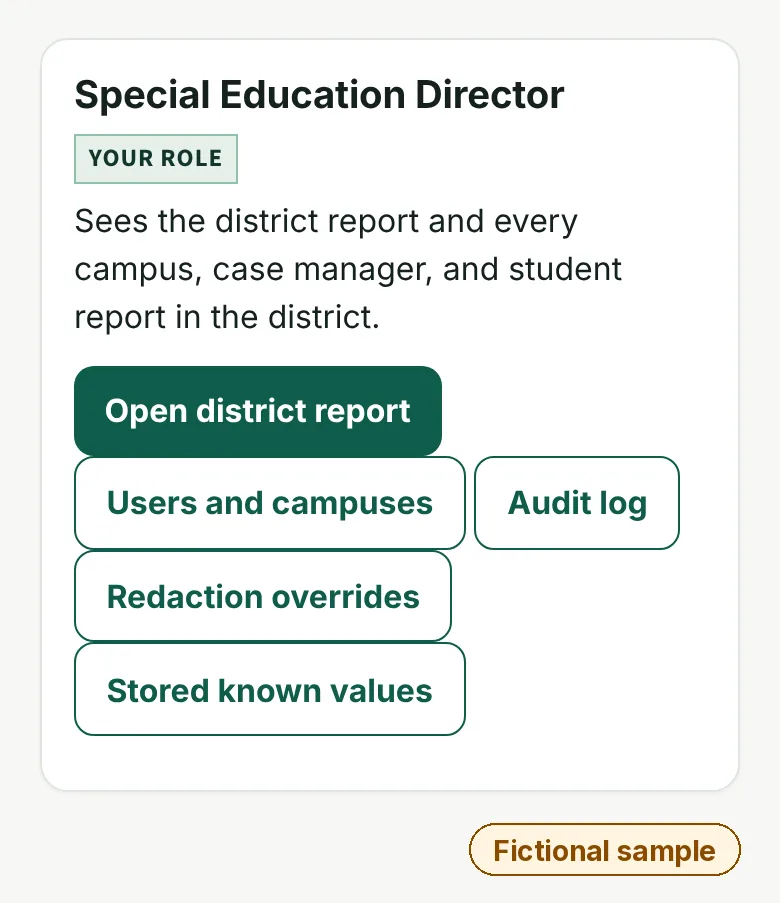
In SpEd Insight™, case managers see upcoming ARDs, re-evaluations, and drafts waiting for review. Directors see every campus, where intensity of service ratings stand, and upcoming ARD deadlines. Gen ed teachers and paras get a limited, log-only view. On first open, they create a passkey on their phone or computer using a one-time setup code from their case manager or director. The passkey is required on every later visit. A forwarded link can't sign in on another device, and a lost passkey is reset by a case manager or director.
Demos use made-up students. Please don't send student information.
- Before any student data: your district signs the TX-NDPA. Student data will be loaded only after that.
- Where data goes: we will host on AWS in the US, with encryption. Student data will never be sold or used for advertising.
- IEPs are education records under FERPA. Under your district's signed TX-NDPA, records will stay under your district's direct control.
- How we handle data
The problem
- Caseloads get tracked in spreadsheets.
- Directors have no single view across campuses.
- Drafts and deadlines sit in different places.
Missed deadlines can become compliance findings, and scattered paperwork wears case managers down.
How it works
- Upload IEPs, one at a time or in bulk. Under your district's signed TX-NDPA, records will stay under your district's direct control.
- Rosters come in by file upload from our template. Roster sync with your student information system is not available yet.
- Case managers work from a caseload view, most urgent first.
- Directors see every campus in one view.
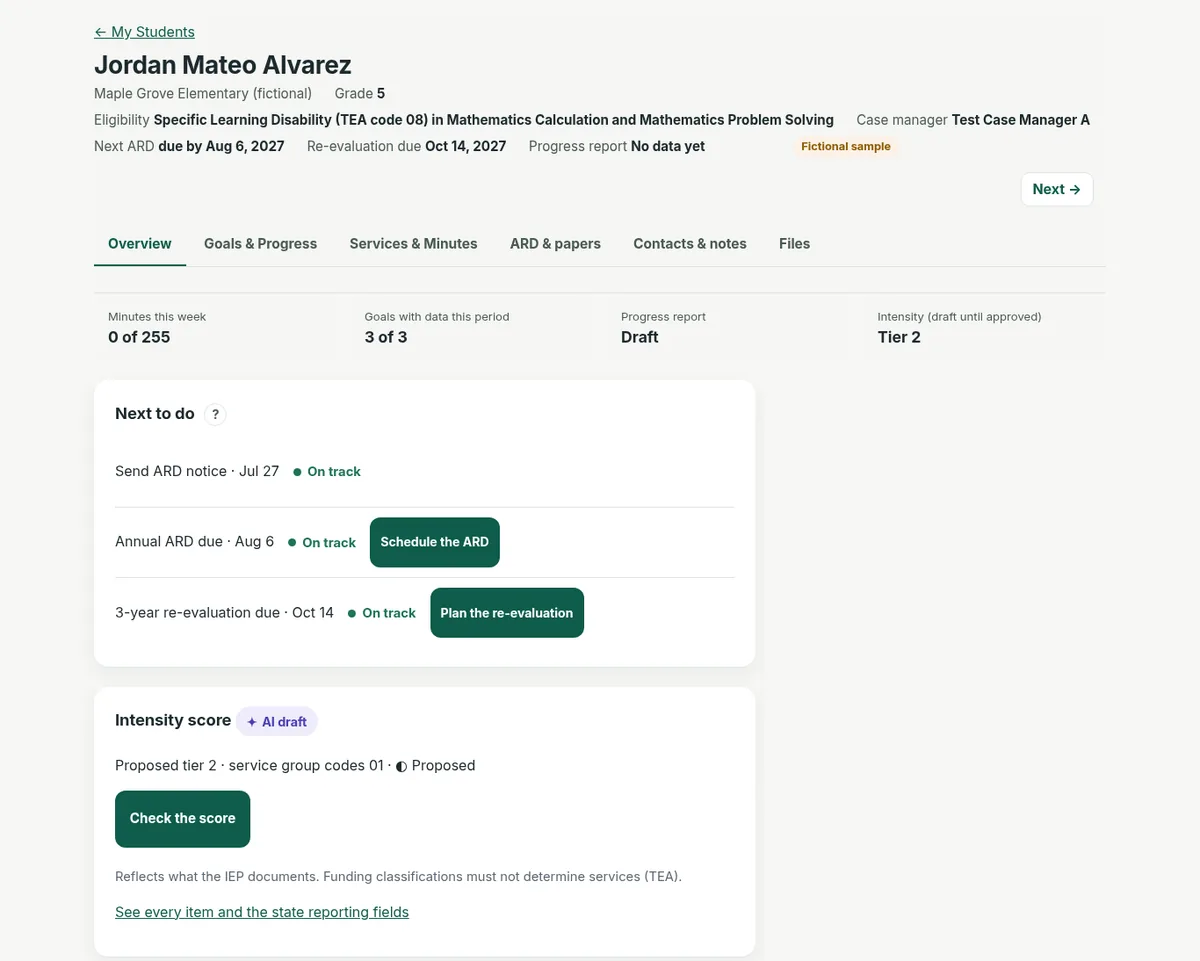
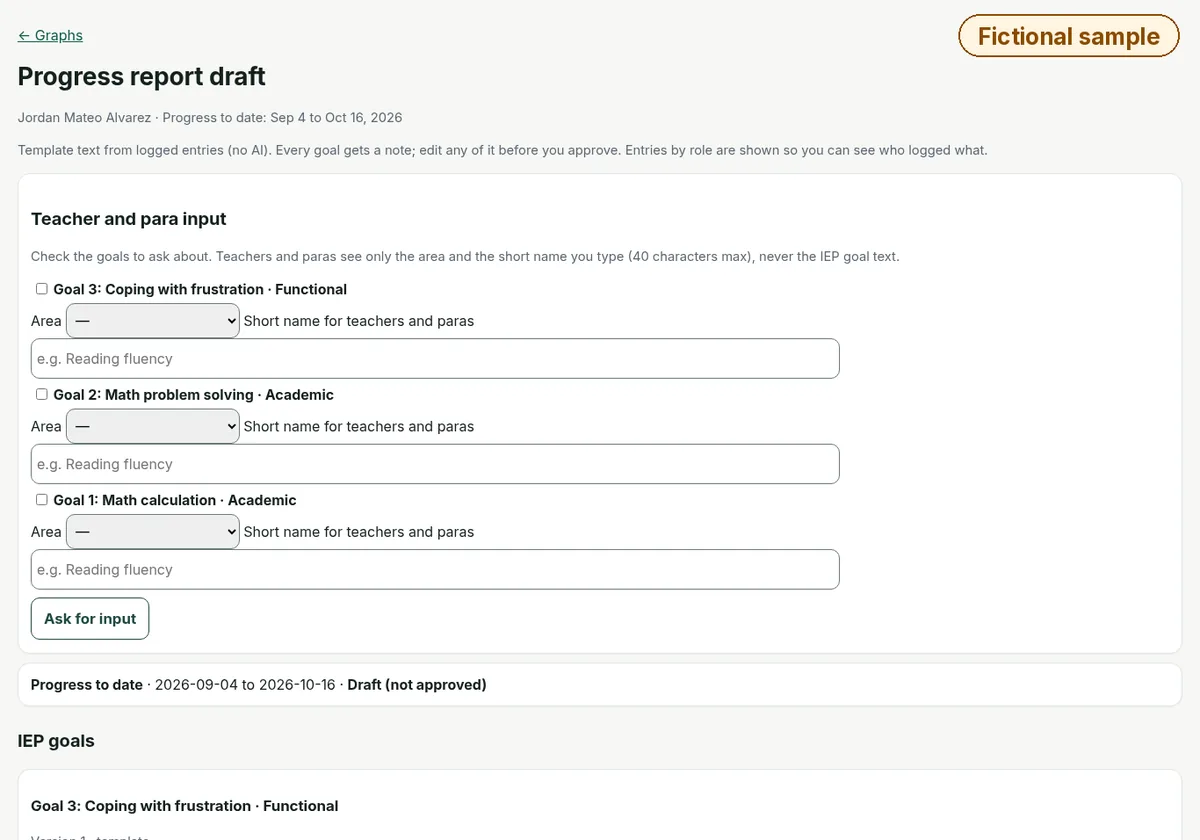
- Act from the to-do list: check score drafts, schedule ARDs, and review progress reports.
See it with made-up students.
Demos use made-up students. Please don't send student information.
Built, in pilot prep Built, in pilot prep
- The caseload view and the director view
- Intensity of service scoring and the draft PEIMS prep file
- IEP drafting from the FIE
- Auto-prepared progress report drafts from your goal data, reviewed and approved by the case manager
- Parent ARD prep sheet in English and Spanish (built, in pilot prep)
- Gen ed teachers and paras get a limited, log-only view. On first open, they create a passkey on their phone or computer using a one-time setup code from their case manager or director. The passkey is required on every later visit. A forwarded link can't sign in on another device, and a lost passkey is reset by a case manager or director.
Built, in testing Built, in testing
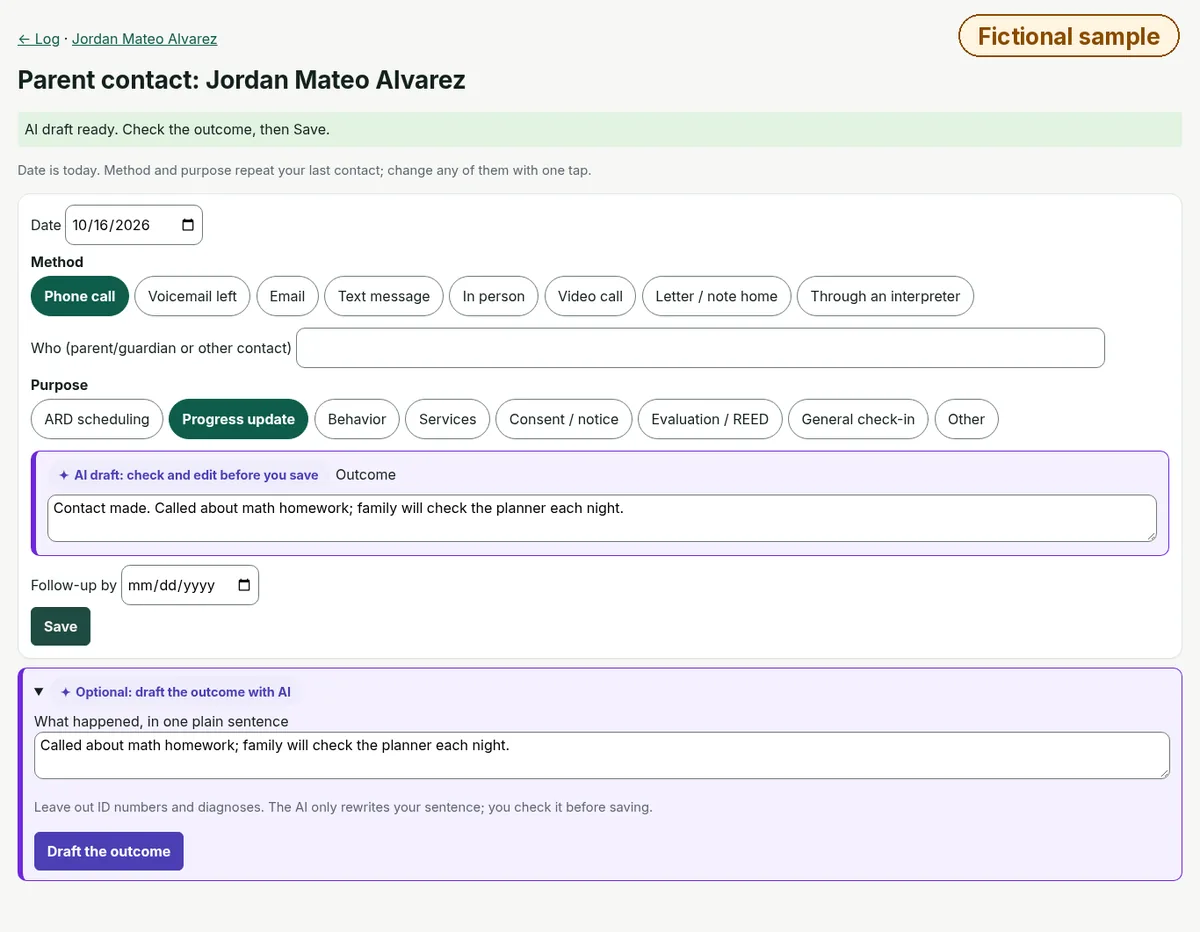
Parent contact outcome drafts: AI summaries the educator checks before saving.
Coming Coming
Plain-language search, behavior plan drafts (district opt-in), the full ARD packet, PWN and deliberations (drafted after the meeting from staff notes), REEDs, and accommodation one-pagers. Planned Push-to-talk entry of one student's goal data. Audio will not be stored, and it stays off until the district signs the TX-NDPA.
How drafts work
Every draft cites its source, and the educator confirms it. AI drafts are proposals for your ARD committee, including the parent, to review and decide.
Privacy. When a district signs the Texas Student Privacy Alliance's Standard Student Data Privacy Agreement (TX-NDPA), SpEd Insight will work with that district's student records as a school official under the district's direct control over how the records are used and kept. We will use student data only to provide the service to that district, will not re-disclose it except as the district directs or the law allows, and will never sell it or use it for advertising. No student data will be loaded until your district signs the TX-NDPA.
Security. SpEd Insight is being built around NIST CSF 2.0; AWS US; only HIPAA-eligible AWS services; encryption in transit and at rest; MFA. SpEd Insight is built for sign-in with your district's Google or Microsoft account. Multi-factor authentication will be required for every account before any student data is loaded.
Screens from the demo
Questions
Who uses it?
Case managers and special ed directors. Gen ed teachers and paras get a limited, log-only view. On first open, they create a passkey on their phone or computer using a one-time setup code from their case manager or director. The passkey is required on every later visit. A forwarded link can't sign in on another device, and a lost passkey is reset by a case manager or director.
Does it replace our IEP system?
No. SpEd Insight can be used alongside Frontline and other IEP systems; no integration required. Your IEP system stays the system of record. Drafts follow TEA Model IEP Form order so they're easy to copy in. This is a layout match only: SpEd Insight does not connect to or exchange data with your IEP system. Frontline is a trademark of its owner. SpEd Insight is not affiliated with or endorsed by Frontline Education.
Is plain-language search available?
Not yet. It's Coming.
How do people sign in?
SpEd Insight is built for sign-in with your district's Google or Microsoft account. Multi-factor authentication will be required for every account before any student data is loaded.
What about student privacy?
When a district signs the Texas Student Privacy Alliance's Standard Student Data Privacy Agreement (TX-NDPA), SpEd Insight will work with that district's student records as a school official under the district's direct control over how the records are used and kept. We will use student data only to provide the service to that district, will not re-disclose it except as the district directs or the law allows, and will never sell it or use it for advertising. No student data will be loaded until your district signs the TX-NDPA.
Talk to James
AI prepares the draft; the educator reviews, edits and confirms it. Every draft cites its source.
Demos use made-up students. Please don't send student information.